
Analyze the existing password from database without refresh using ajax concept. The given password is compared with existing password in database and display whether it is correct or not. Here Ajax is used to analyze or check the exisiting password with The HTML, Ajax,Mysql coding are provided below.You can try if you need to check existing password and change password using Ajax.
Table structure for table `change_password`
[code type=html]
CREATE TABLE IF NOT EXISTS `change_password` (
`id` int(11) NOT NULL AUTO_INCREMENT,
`username` varchar(50) NOT NULL,
`password` varchar(50) NOT NULL,
`confirm_password` varchar(50) NOT NULL,
PRIMARY KEY (`id`)
)
INSERT INTO `change_password` (`id`, `username`, `password`, `confirm_password`) VALUES
(1, ‘ramkumar’, ‘123’, ‘123’);
[/code]
Change_password.php
[code type=html]
<?php
include(“conn.php”);
if(isset($_POST[‘submit’]))
{
$password=mysql_real_escape_string($_POST[‘password’]);
$confirmpasssword=mysql_real_escape_string($_POST[‘confirmpassword’]);
if($password==$confirmpasssword)
{
$insert=(“update change_password set password=’$confirmpasssword’, confirm_password=’$confirmpasssword’ where username=’ramkumar'”);
$insert1=mysql_query($insert);
echo “<script> alert(‘Your password is changed’);</script>”;
}
else
{
echo “<script> alert(Your password is changed);</script>”;
}
}
?>
<html>
<head>
<title>Change Password</title>
<script type=”text/javascript”>
function showUser(str)
{
if (str==””)
{
document.getElementById(“txtHint”).innerHTML=””;
return;
}
if (window.XMLHttpRequest)
{// code for IE7+, Firefox, Chrome, Opera, Safari
xmlhttp=new XMLHttpRequest();
}
else
{// code for IE6, IE5
xmlhttp=new ActiveXObject(“Microsoft.XMLHTTP”);
}
xmlhttp.onreadystatechange=function()
{
if (xmlhttp.readyState==4 && xmlhttp.status==200)
{
document.getElementById(“txtHint”).innerHTML=xmlhttp.responseText;
}
}
xmlhttp.open(“GET”,”check_password.php?q=”+str,true);
xmlhttp.send();
}
</script>
<script type=”text/javascript”>
function pass()
{
var pwd=document.getElementById(“password”).value;
var cpwd=document.getElementById(“confirmpassword”).value;
if(pwd==cpwd)
{
var t1=document.getElementById(‘pass’).innerHTML=”Password Match”;
/*t1.style.display=’block’;*/
}
else
{
var t1=document.getElementById(‘pass’).innerHTML=”Password does not Match”;
/* t1.style.display=’block’;*/
document.form.password.focus();
}
}
</script>
<style type=”text/css”>
body
{
}
.table
{
color:#000000;
}
.st
{
color:#FF0000;
}
</style>
</head>
<form id=”form” name=”form” method=”post” action=”” onSubmit=”return passvali();”>
<table width=”50%” border=”0″ cellspacing=”0″ cellpadding=”5″ align=”center” bgcolor=”#C1C1FF”>
<tr>
<td colspan=”2″ align=”center”> <h2>Change Password</h2></td>
</tr>
<tr>
<th> Current Password <span style=”color:#F00;”>*</span></th>
<td><input type=”password” name=”cur_pwd” class=”input”id=”oldpassword”placeholder=”Enter Current Password” onChange=”showUser(this.value)” /></td>
<td> <span class=”st” id=”txtHint”></span> </td>
</tr>
<tr>
<th>New Password <span style=”color:#F00;”>*</span></th>
<td><input type=”password” name=”password” class=”input” id=”password” placeholder=”Enter your Password”/></td>
</tr>
<tr>
<th> Confirm Password <span style=”color:#F00;”>*</span></th>
<td><input type=”password” name=”confirmpassword” class=”input” id=”confirmpassword” placeholder=”Enter Confirm Password” onChange=”return pass()” /></td>
<td><span id=”pass” style=”color:#F00;”> </span> </td>
</tr>
<tr>
</tr>
<tr>
<td colspan=”2″ align=”center”><input type=”submit” name=”submit” value=”Submit” style=”width:80px;” /></td>
</tr>
</table>
</form>
</body>
</html>
[/code]
check_password.php
[code type=html]
<?php
include(‘conn.php’);
$password=$_GET[‘q’];
$select=mysql_query(“select * from change_password where username=’ramkumar'”);
$fetch=mysql_fetch_array($select);
$data_pwd=$fetch[‘password’];
if($data_pwd==$password)
{
echo “Password match”;
}
else
{
echo “provide valid password”;
}
?>
[/code]
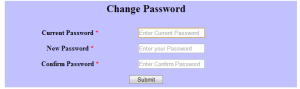
Form Design
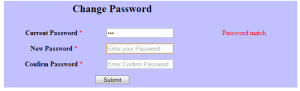
Password Checking from database using Ajax:
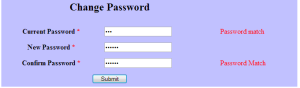
Password Matching:
Pingback: Advance Password Strength Check Using jQuery | Freeze Coders
check_password.php
Shouldn’t this really be called update_password.php and be about updating the password?
My bad on both points!
Good script.
I didn’t check the form previews properly. Hard to see them.
I realy appreciate your work ..good luck.